
Heyy there, I hope you are doing great. Another week, another lesson from NCP. This lesson can be really useful for my fellow data analysts/scientists. In this lesson, we will learn how to handle missing data from a dataframe. A dataframe is a data structure that contains data organized in form of rows and columns. Each column in a dataframe can store values of different data types but it should stay consistent throughout the column i.e. all the rows in a column should have the same data type.

Data
analysts/scientists and even common people may sometimes need to work with huge
dataframes. But sometimes, the data you have collected may be missing some
values and that could really mess up your models. Learning how to handle such
missing values in data is an essential part of working with huge data.
Handling
such missing/unknown values is crucial for machine learning models. If you have missing values in your data, then
the model that will be generated based on that data will not be accurate and
hence will not produce accurate results.
CREATING A DATAFRAME USING PANDAS:
Before
learning how to handle missing data in a dataframe. You might want to learn how
to create a dataframe in the first place. You can do so by reading a csv file
that contains the data, and store it in a variable. Also, in order
to work with dataframes in Python, you must have the ‘Pandas’ library installed. Just use the following code to install pandas:
python
pip install pandas
If
you need a more detailed guide on installing third-party modules, feel free to
check out this article.
After you have got the ‘Pandas’ library installed, all you need to do now is import it as 'pd':
import pandas as pd
Now you can create a dataframe by simple reading the csv file using 'pd.read_csv()' and storing the content of the csv file in a variable:
df = pd.read_csv('C:\\Users\\Noob Code Pro\\Documents\\class.csv')

'df' contains our dataframe. Specify the file path of your csv file inside the brackets.
DROPPING ROWS AND COLUMNS:
One
way to handle missing values is to completely drop the rows and columns that
have missing data. This may sound really aggressive but sometimes it does come
in handy if you don’t want duplicated or missing data in your model.
drop():
You
can use the ‘drop()’
method to drop specific columns. It takes a list of columns as a parameter and
them removes them from the dataframe.
Let
us say, we have a dataframe, ‘df’, which
contains information about students in a class. It has columns for ‘NAME’, ‘AGE’, ‘RELIGION’ and ‘SEX’ of each student in the class:
df.drop([‘RELIGION’, ‘SEX’], axis = 1, inplace = True)

This
line will drop/remove the ‘Sex’ and ‘Religion’ columns from our dataframe. ‘axis = 1’ removes all the rows in
these particular columns. ‘inplace =
True’ makes changes to the dataframe and saves it without creating a new
dataframe.
dropna():
The
missing values in our dataframe are filled with or labelled as ‘NaN’ (Not a Number). Our goal is to drop/remove
every NaN value from our dataframe.
You
can do this by simply using the ‘dropna()’ method:
df.dropna(inplace = True)

Here,
‘df’ is your dataframe from which
you want to remove the missing values, ‘dropna()’
is the method that will drop those missing values and ‘inplace = True’ makes changes to the dataframe.
Note: You can drop the NaN values in the dataframe without using ‘inplace = True’. If you do not use ‘inplace = True’ then the program will return a new dataframe with the made changes. ‘inplace = True’ makes sure that the changes are made to the current dataframe without creating a new one.
Let’s
say you want to check some specific columns for missing data. With a Pandas
dataframe, you can do that as well:
df.dropna(subset = [‘AGE’, ‘NAME’], inplace = True)
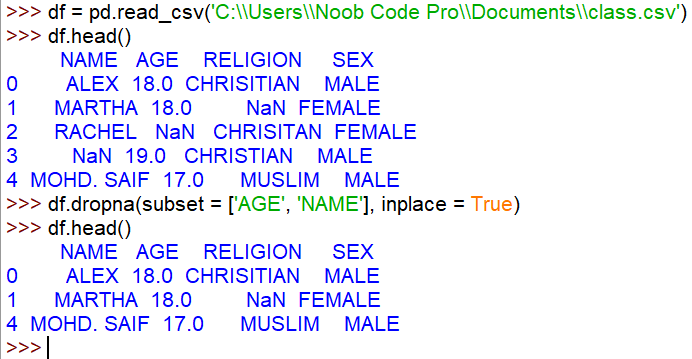
In this case, Python will only check the ‘AGE’ and ‘NAME’ columns for any missing values and if any row in these specifics columns is missing some data then the whole row is dropped. This is especially useful when you are dealing with some super important columns that are required to have complete data.
CONCLUSION:
This is just one way of dealing with missing values. Dropping rows and columns is very useful when creating machine learning models or just analyzing data in general. Since a machine cannot handle such missing values by itself, it is our job to make it easier for the machine to analyze the data and create a more accurate model.
Can you think of another way of dealing with missing data? Share it with us in the comments below! If you found this article helpful, then do share it with your friends who work with large data frequently and might be bothered by these missing/unknown data. Leaving a like would be another way to show some appreciation ;)
Have some queries or questions? You can always find me in the comments section, telegram channel or my Pinterest profile where you can personally talk to me and ask me questions about anything we have learnt so far.
If you are looking to join a community of programmers, you can join Noob Code Pro’s official telegram channel and be among programmers like you for free.
Stay tuned for another article next week, same time, where we will discuss about a new topic/concept in programming, what they are, how they work and where you use them. More cool stuff coming your way, DON’T MISS IT !! And I'll see you next week. Goodbye and Good Luck :)
I hope this article answered all of your questions and even helped you in becoming a better programmer. FOLLOW NOOB CODE PRO TO BECOME A PROFESSIONAL PYTHON PROGRAMMER FROM A TOTAL BEGINNER.

HOPE YOU HAVE AN AWESOME DAY AHEAD !!!


0 Comments
Welcome to the comments section, this is where you can contact me personally for any doubts or feedback